
For students who have previously logged into CAS Shield but have now forgotten their password, you will need to "Reset password".
For students who have never accessed CAS Shield (i.e. never clicked on the welcome email and set up their password), you will need to "Resend invitation".
In this article, we will show how to carry out both actions.
Please note: these instructions will only work when selecting ONE student record. If you select multiple student records, neither the reset password or resend invitation options will be available to select.
Step by step instructions on how to reset password
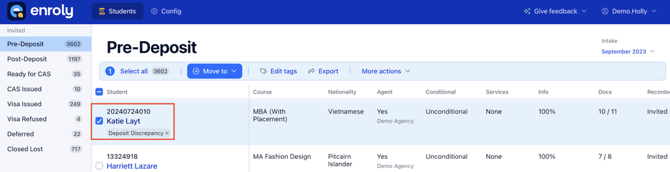
2. Click the button "More actions" which will show a drop down menu. From there you have multiple options. In this instance, you will need to click on the "Reset password" button which is the top option in the list.
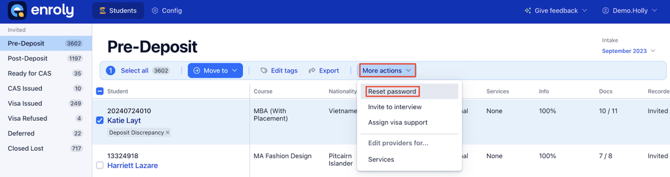
3. You will be prompted if you would like to go ahead and reset that student's record, the message shows the student ID for confirmation. Go ahead and click on the button that says "Reset password".
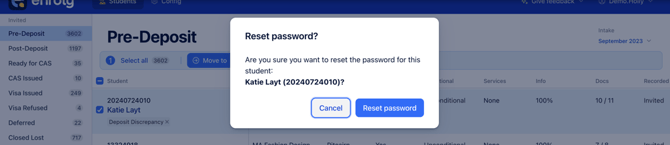
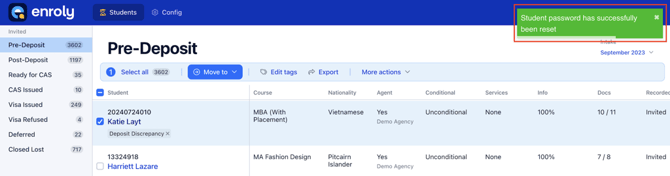
4. Once you have sent the password reset to the student, a green confirmation message will show in the top right corner of CAS Shield confirming this.
Step by step instructions on how to resend a CAS Shield invitation
1. Select the student record you wish to resend the invitation by ticking the check box next to their name.
.png?width=670&height=342&name=58432b8a-5363-45b1-ac64-9abaeadf4168%20(1).png)
2. Click the button "More actions" which will then show a drop down menu. In this instance, choose the "Resend invitation" option. Here, as the student has never logged in, there is no Reset Password option because they have not yet set their initial password from the CAS Shield welcome email.
.png?width=670&height=327&name=291a3909-e13c-4e5f-adc1-805fe6250de0%20(1).png)
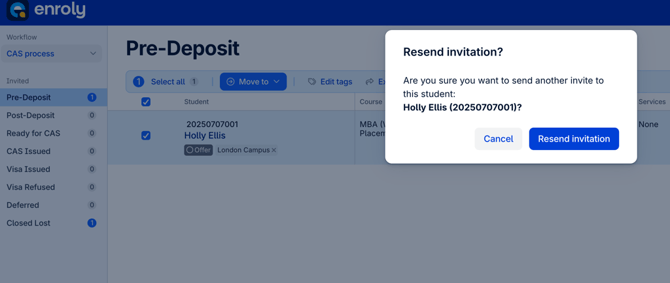
3. A pop up box will appear asking you to confirm that you wish to send another invitation (the student number and name will be shown for clarification). Click "Resend invitation".
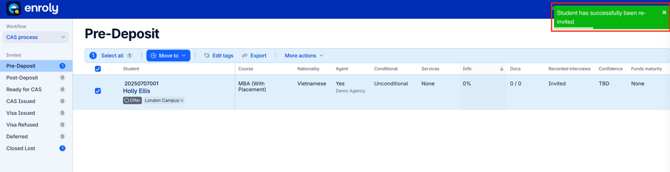
4. Once you have resent the invitation, a green confirmation message will show in the top right hand corner of CAS Shield to confirm this.
Note: CAS Shield invitations are sent automatically upon creation of the record on CAS Shield and resent every 7 days until the student creates an account. If the student changes email address, a new invitation will be resent automatically.