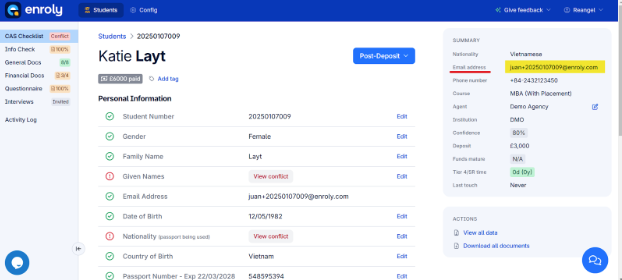
Step 1: Verify the student’s email address
- Check that the student is using the correct email address as registered in CAS Shield.
- To confirm, please take a look at the student in CAS Shield and check their record.
- If the email is incorrect, the university team should check or update it in the student records system.
- The correct email will be updated in CAS Shield in the next import or sync.
Step 2: Check if the student is using the correct CAS Shield link.
- Note that there are cases where students use the incorrect CAS Shield link, resulting in their being unable to log in. They sometimes use the agent or the university CAS shield link.
- Request a full screenshot of their browser, including the URL field to verify.
Step 3: Check for duplicate records
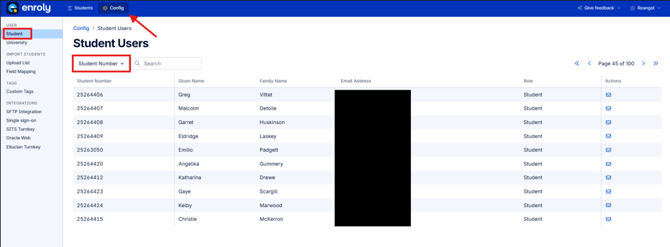
- The first option on how to check for duplicates is via Config.
- Search for the student using the email address. If the student number is not the same as what you're trying to find, it's a duplicate.
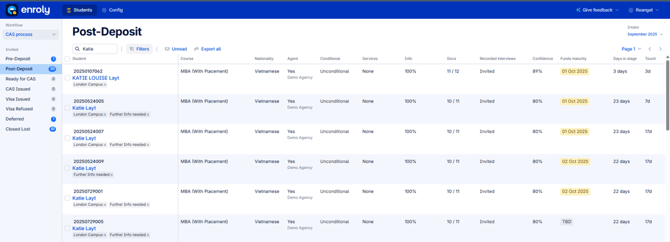
- Another option to check for duplicates is via spreadsheet view.
- Search for the first name of the student, and check in every intake. Usually, the duplicate can be seen in the same intake month from last year, e.g., if the student has an offer in September 2025, you may want to check either the last intake or the intake from September 2024.
- If merging of record is needed, please merge the duplicates first in the student management system.
- Once done, reach out to CAS Shield Technical Support, provide the duplicate student IDs, mention what ID should still be active.
Step 4: Resend invitation or Reset password
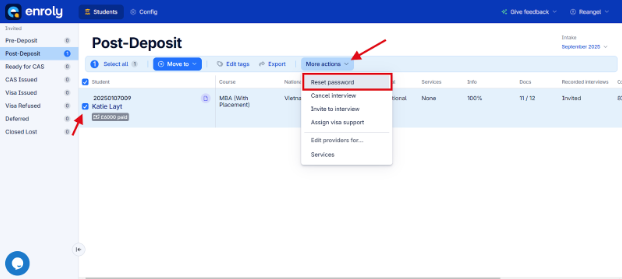
- If the options under 'More actions' (as above) are available, click on either 'Resend invitation' or 'Reset password' and confirm with the student if they received the email link.
Reminder, 'Reset password' means the student has previously logged into CAS Shield, whereas 'Resend invitation' will show for those students who have never accessed their account. -
If not, ask the student to check if it’s in the spam/junk folder.
-
If multiple links have been sent but the student insists on not receiving any email link from CAS Shield, and the email is correct, ask for help from the Live Chat Support team in CAS Shield so this can be investigated further.