
This article explains how an applicant's offer moves automatically from Apply into CAS Shield when set conditions are met, so the applicant can begin their visa/CAS journey. Understanding this will help you support overseas applicants moving between the two platforms. It's especially relevant for institutions managing high volumes of international applicants who require a student visa.
When an offer transitions
The transition is configurable per institution, so you can choose the point at which the CAS Shield journey should begin.
Every transition requires all three of these conditions, regardless of configuration:
- Fee status is Overseas
- The applicant requires a UK visa
- The offer status is Unconditional
These are non-negotiable preconditions, an offer will never transition without all three.
Beyond those, you choose the transition point from the following options:
- Disabled, no transition ever occurs.
- Unconditional, immediately after an unconditional offer is issued.
- Unconditional + Accepted, once the offer is unconditional and accepted by the applicant.
- Unconditional + Finance Cleared, once the offer is unconditional and the payment tasks are satisfied or exempt.
- Completed, once the offer is accepted, and all payment tasks and all enrolment tasks are satisfied or exempt.
What transfers to CAS Shield
Applicant data
- All personal and academic data collected in Apply is mapped across to CAS Shield.
- It appears pre-filled in the applicant's CAS Shield checklist, and remains editable.
Documents
- Documents transfer only where the requirement was marked Satisfied.
- Directly mapped documents are linked to the equivalent CAS Shield requirement: passport, academic certificate, academic transcript, English test result, and deposit.
- Other documents are carried across and labelled.
- Multiple documents per requirement are supported.
Documents from re-requested requirements are not transferred. They remain available in Apply (Programme ▸ Requirement ▸ Previous) for university reference.
Course data
- The essential course information needed in CAS Shield is carried over from Apply and your course configuration.
Agent assignment
- If the application was created or assigned to an agent, the agent's details transfer and their access continues in CAS Shield.
The applicant and agent experience
Unified login
- Applicants access CAS Shield using their existing Apply credentials — no need to re-register or set a new password.
Welcome email
- When an applicant transitions, they receive a dedicated welcome email (subject: "You now have access to CAS Shield").
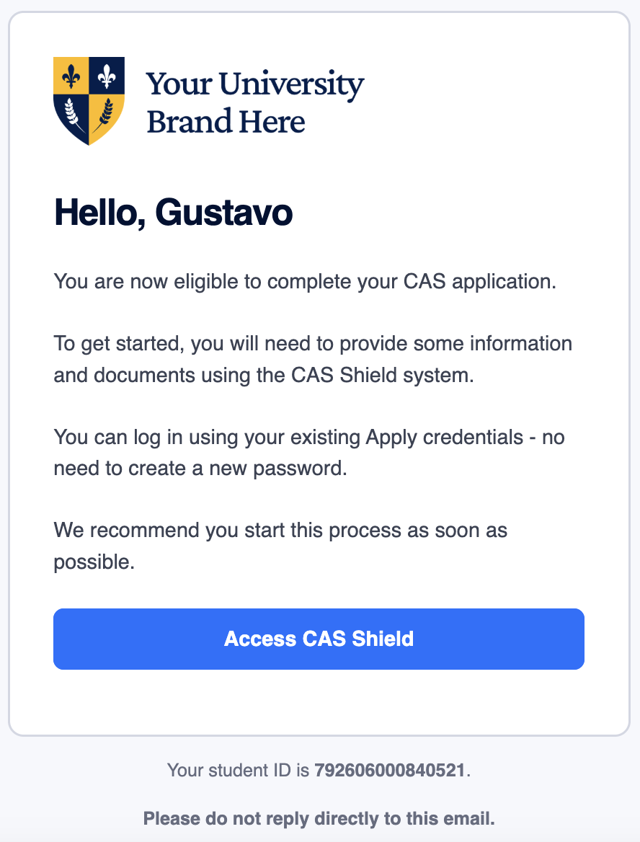
Cross-navigation between platforms
Once an offer has transitioned, applicants, agents and university staff can move directly between the two platforms via contextual links:
- In Apply, a "View in CAS Shield" button links to the applicant's CAS Shield record (in the University View summary panel, and in the side navigation for applicants and agents).
- In CAS Shield, a "View in Apply" button links back to the original Apply offer.
- These links appear only for transitioned offers.
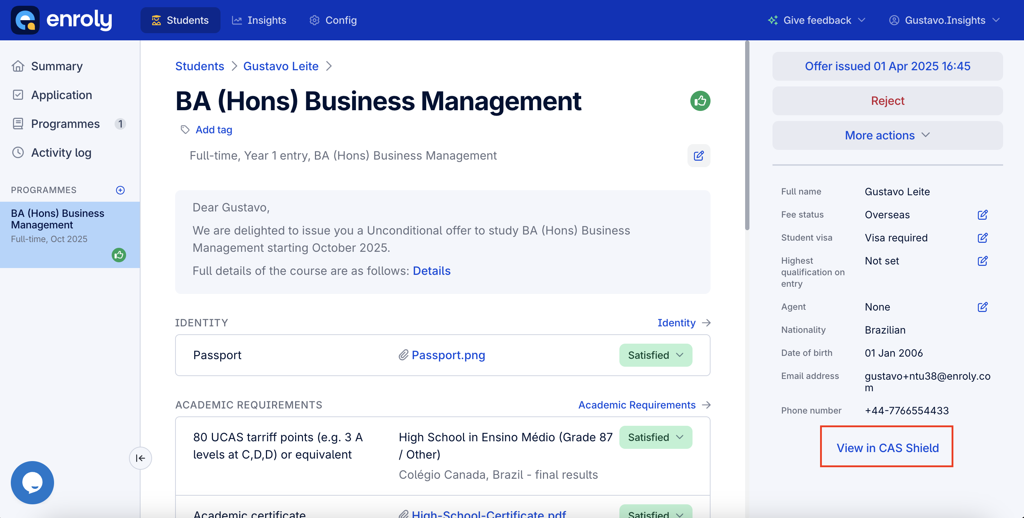
These buttons let admissions staff quickly compare and verify applicant data across both platforms.
Summary
|
Area |
Behaviour |
|
Transition logic |
Fully configurable (disabled, unconditional, finance-cleared, completed, etc.) |
|
Data transfer |
Applicant and course data carried across; mapped documents linked to their CAS Shield requirement |
|
Agent handling |
Agent details preserved and access granted in CAS Shield |
|
Applicant login |
Unified credentials — no re-registration |
|
Platform navigation |
Two-way links between Apply and CAS Shield for transitioned offers |
|
Risk region + intake |
Risk-based steps and intake triggers respected after transition |